

Service Scaling Through Native Cloud Computing
Being in cloud is just a start – it’s even more important to take advantage of the special opportunities provided by cloud computing, one of which is the almost unlimited scalability of the applications and services you make available through the cloud. However, you first need to make sure the services you use are cloud-native and use orchestration services such as Kubernetes. The following overview of the architecture of one such system was prepared by our cloud experts.
First, the software and libraries required at the operating system level must be bundled using so-called containers. Containers use the kernel of the host operating system, but are separated from other containers and from the host at the process and file level. In addition, containers can be precisely configured in terms of the amount of resources they consume.
Operating these containers within a cluster of virtual or physical computers requires the use of a container orchestrator. Kubernetes represents the dominant container orchestrator on the market (with a market share between 80 and 90 percent, depending on the survey in question); Docker Swarm and Apache Mesos provide alternative orchestrator options but only play a minor role on the market.
Kubernetes was originally developed by Google and was released in 2014 as an open source platform for the automatic deployment, scaling and management of containerized applications. Today, Kubernetes is managed by the Cloud Native Computing Foundation (CNCF). The CNCF was founded in 2015 as a non-profit organization, and is part of the Linux Foundation, which means that the continued development of Kubernetes is ensured well into the future.
A business looking to use Kubernetes can either install it itself on-premise or in the cloud, or can make use of a managed Kubernetes cluster, though market research (https://security.stackrox.com/state-of-containers-and-kubernetes-security-report-winter-2020.html, no longer online) shows the number of self-managed Kubernetes installations is dwindling, while the use of managed Kubernetes cluster services is growing greatly.
Architecture of a Managed Kubernetes Cluster
A Kubernetes cluster (K8s) consists of 2 components:
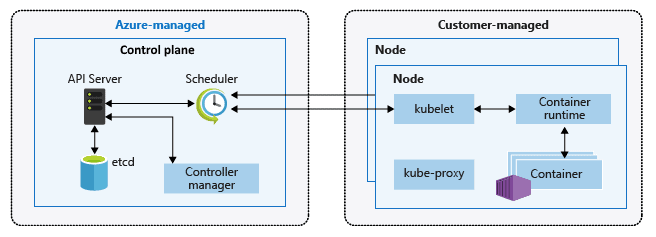
- The control plane takes over the control of the K8. It is managed by the provider and is often even provided free of charge.
- Nodes on which the applications packaged in containers run. The nodes on which the applications are deployed are managed by the customer and billed like virtual machines depending on the processor type, the number of virtual VPUs and the RAM. Nodes are grouped together in node pools.
Implementing a Managed Kubernetes Cluster (K8s)
A K8s can be installed in a number of ways – via command line, through the cloud provider’s portal or by using tools such as Rancher or Terraform.
The number of nodes and Kubernetes version is specified during installation, and some providers make it possible to specify a higher availability for the control plane. The K8s then becomes available after 5 to 15 minutes. K8s performance can be modified at any time by adding or removing nodes. As with VMs, a provider will bill the nodes configured in a K8s independently of their utilization. Autoscaling is one option available for optimizing costs.
Autoscaling in the Cloud
Autoscaling can be used to automatically provide an application with additional resources (CPU and RAM) as needed. Administrators can configure the related rules in advance, using parameters such as number of requests, CPU/RAM utilization, etc., so that manual steps during operational management are unnecessary and the application reacts virtually immediately to changes.
Both upscaling as well as resource reduction can be performed automatically, meaning both the number of nodes is automatically adjusted (based on configuration) and applications/services in additional instances are started or stopped. This is made possible through so-called pods.
A pod represents the smallest deployable object in a Kubernetes cluster, and one or more containers can run in a pod. A pod represents one instance of an application, and an application can be upscaled (= horizontal scaling) by starting up additional pods.
Practical Example of Autoscaling in the Cloud
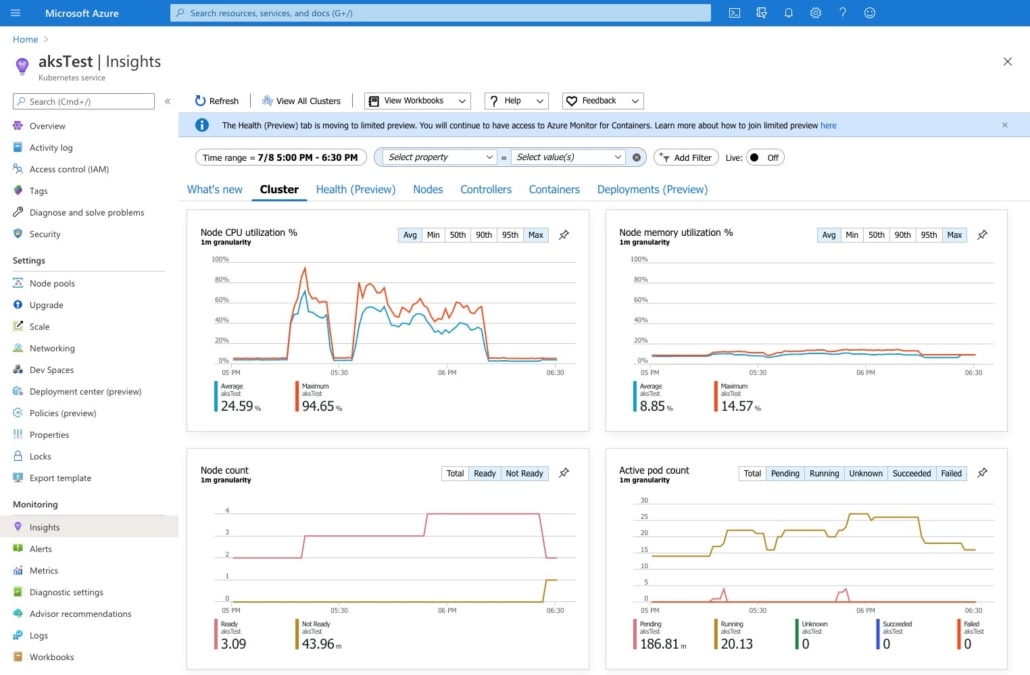
The example above clearly shows how the autoscaler begins to start up additional pods (graphic at lower right) when the critical processor load defined by the administrator is reached. However, since the current nodes are above the load limit and additional pods cannot start up (shown by the small red peaks in the graphic to the lower right), additional nodes must first be started up. The application will then be able to manage the increased usage volume with the help of the additional nodes and pods.
Our Goal: A Cloud Strategy for Your Company
Before you can develop a complete cloud strategy and implement it meaningfully for your business, you should become familiar with cloud-native methods. A basic understanding of how scaling works in the cloud will help you to better identify application cases and processes that can benefit from it. A scalability approach which is simple yet comprehensive is one of the many ways you can get the best out of the cloud, and our courses and consulting services can show you how you and your company can make optimal use of the opportunities provided by cloud computing.